Free AI Elevation Design
Photograph the front of your house and see new facade concepts that keep its outline, floors and openings.
Start with your photo
Job: Whole new lookPhotograph the front elevation, straight on
- See it on your house
- Know what it takes
- Get it built
2 free designs a day · No watermark · No card needed
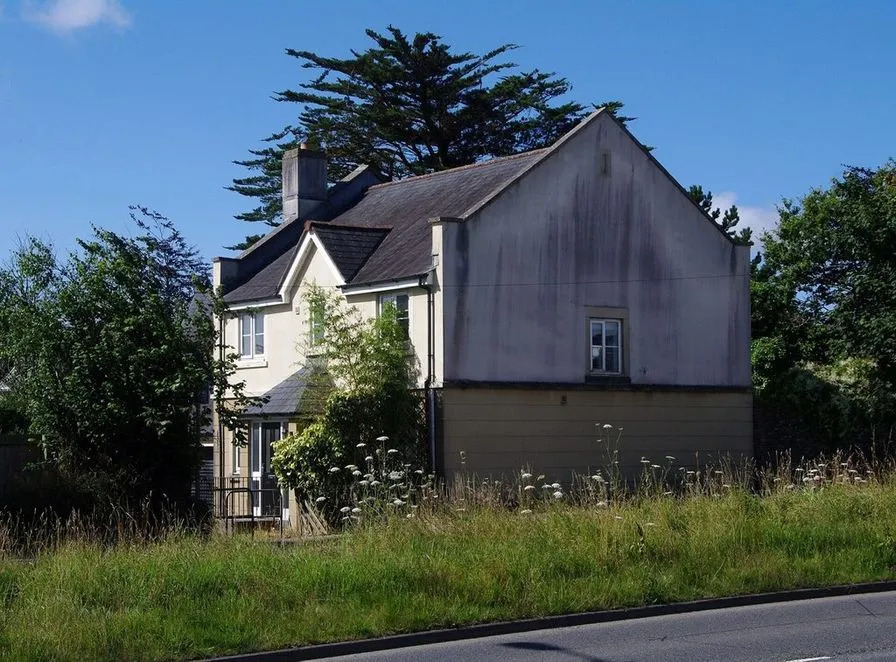 Before
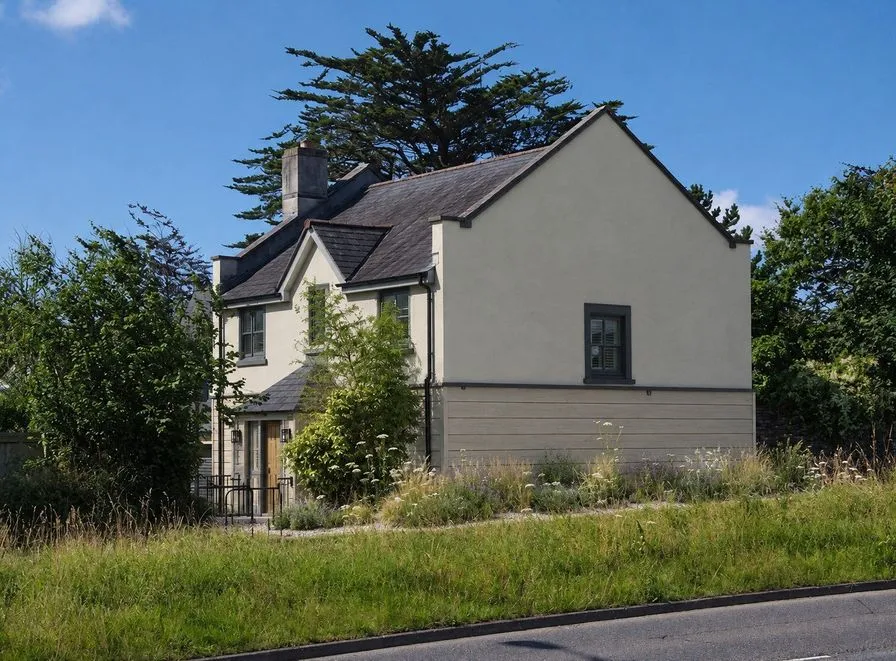 AI concept
Quick answer
Can AI design a front elevation from a photo?
Yes. Upload a straight-on photo of the front of your house and pick a style. HomeGPT keeps the outline, the number of floors, the roofline and every window and door where they are, and draws two facade options: wall finish and color, trim, front door, wall lights and front planting, each with a rough quantity and a typical local price. For paint alone, use the exterior paint visualizer.
A real front elevation, restyled by the AI
A real house and the AI concept for it: a new wall finish, trim and entrance on the same outline, windows and roof.
Every example is a real photo and the result for it as it came out, judged blind before it went on this page.
How it works
- See it on your houseTwo options on a photo of your own home. Your windows, doors and roofline stay put.
- Know what it takesMaterials, rough quantities and a typical price range, with the source and date.
- Get it builtSend one brief to contractors so every quote covers the same work, and keep the whole project in one plan.
What an elevation concept changes, and what it keeps
An elevation is the look of a building from one side, most often the front people see from the street. On a photo, the parts that change the look most are the wall finish and its color, the trim and window frames, the front door, the wall lights and the planting along the front. Those are what each option redraws.
What stays: the building outline, the number of floors, the roof and roofline, the porch, bay windows, chimneys and garage, and every window and door opening. That keeps each concept buildable on the house you have, and makes two options easy to compare with your photo.
Available design styles
The styles on offer are the ones that passed blind tests on real houses, so the list is short on purpose and grows as more pass.
Modern farmhouse
White board-and-batten or pale stucco, black frames and a natural wood door.
Coastal
Soft whites and pale gray-blue walls, crisp trim and relaxed grasses at the front.
Scandinavian
Pale mineral stucco, charcoal frames, a light wood door and simple lighting.
Modern, contemporary, minimalist, traditional, classical and Mediterranean elevations are the directions people search for most. Each changes the facade composition: materials, color blocking, window framing and the entrance. Compare the styles above on your own photo, and take the result to your architect or builder as a visual brief.
Single floor, double floor and row houses
The job works on single-story, two-story and multi-level homes, duplexes and row houses. The clearer the photo of the whole facade, the better the concept: stand back far enough to fit the house in, shoot straight on in daylight, and keep cars and trash cans out of the frame where you can.
On a duplex, twin home or row house, make sure the photo shows which part is yours. For quantities, the siding calculator and exterior paint calculator turn the facade into materials.
Why use AI for design
Ideas from your photo
Each concept is drawn onto the photo you upload, on your actual structure.
Two options at once
Every design draws option A and option B, two distinct facade directions in one style.
Any house front
Works with single-family houses, duplexes and row houses, one story or several.
What it takes
Each item lists the paint or material, a rough quantity and a typical price you can check.
Easy to use
Upload a photo, pick a style, then untick what you would skip.
Free to start
2 free designs a day with no card and no account needed to start.
Ready to transform your space?
Upload a photo of your home and use AI to create front elevation and facade concepts on your own house, free to start.
Planning the street view as a whole? See AI curb appeal for the front yard, and AI exterior design for the rest of the house.
Questions
Frequently asked questions
What is AI elevation design?
Elevation design is the look of a building viewed from one side, most often the front elevation people see from the street. An AI elevation generator takes a photo of your home and draws redesigned elevations on it: new facade finishes and colors, trim, the entrance and planting, on the structure you already have.
Can AI design a front elevation from a photo?
Yes. Upload a straight-on photo of your home and HomeGPT draws front elevation concepts on your actual structure. It keeps the building outline, roofline and openings while reimagining stucco, siding, trim and color.
Does it work for single floor and double floor homes?
Yes. It handles single-story, two-story and multi-level homes, plus duplexes and row houses. The clearer the photo of the full facade, the better the elevation concepts.
What elevation styles can I generate?
The styles that passed blind tests on real houses: modern farmhouse, coastal and Scandinavian today, with more added as they pass. Each changes the facade materials, color blocking, window framing and entrance, so you can compare directions before briefing an architect.
Is the AI elevation design tool free?
Yes. You get 2 free designs a day with no card and no watermark, and no account is needed to start. Each design draws two options on your photo.
Can I use AI elevation designs with my architect or builder?
Yes, that is the best workflow. Keep the option you like, untick anything you would skip, and share it with your architect or builder as a visual brief. They handle structural feasibility, materials and local approvals.
AI concepts, not quotes. Every price shows its basis and date. Your photo stays private.