AI Home Exterior Design Free
Upload a photo of your house and see a whole new look drawn onto it: walls, trim, front door, lights and planting, with what each change takes.
Start with your photo
Job: Whole new lookPhotograph the front of your house, straight on
- See it on your house
- Know what it takes
- Get it built
2 free designs a day · No watermark · No card needed
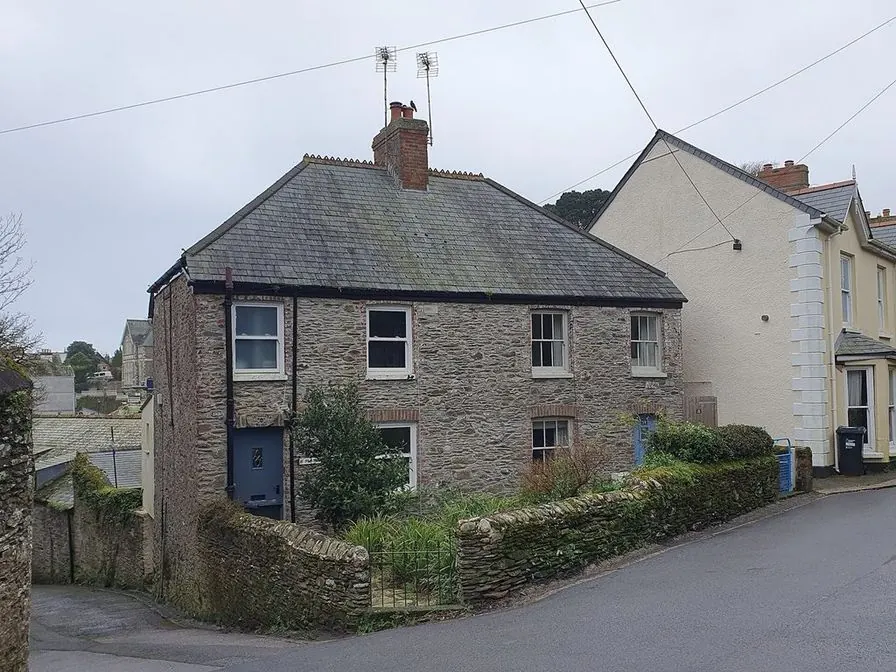 Before
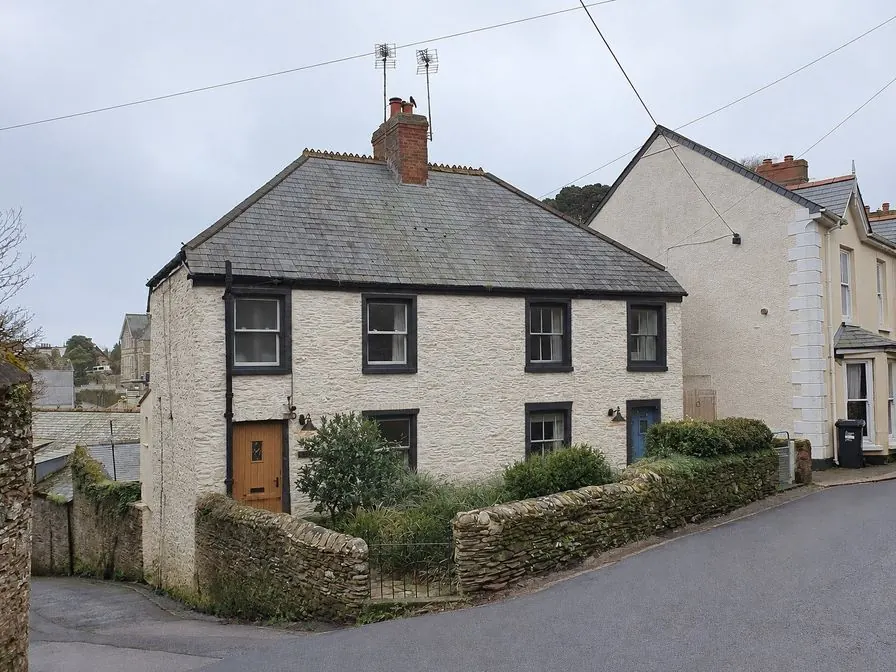 AI concept
Quick answer
Can AI redesign my house exterior from a photo?
Yes. Upload a straight-on photo of the front of your house and pick a style. HomeGPT keeps the roofline, windows and doors where they are and draws two options for the walls, trim, front door, wall lights and planting, each tagged with the material or paint, a rough quantity and a typical local price. You get 2 free designs a day with no card. For color alone, use the exterior paint visualizer.
See the transformation
Real photos of real houses and the AI concept for each. Same roofline and openings; new walls, trim, door and planting.
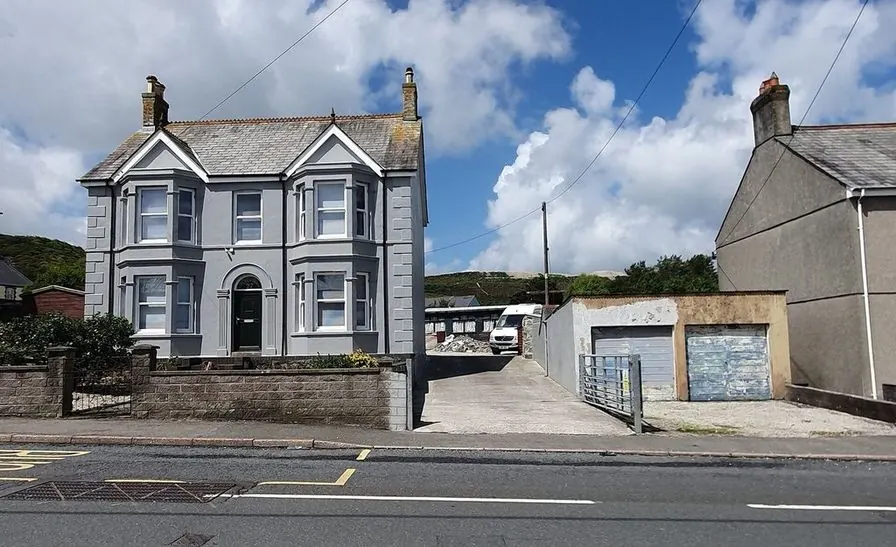 Before
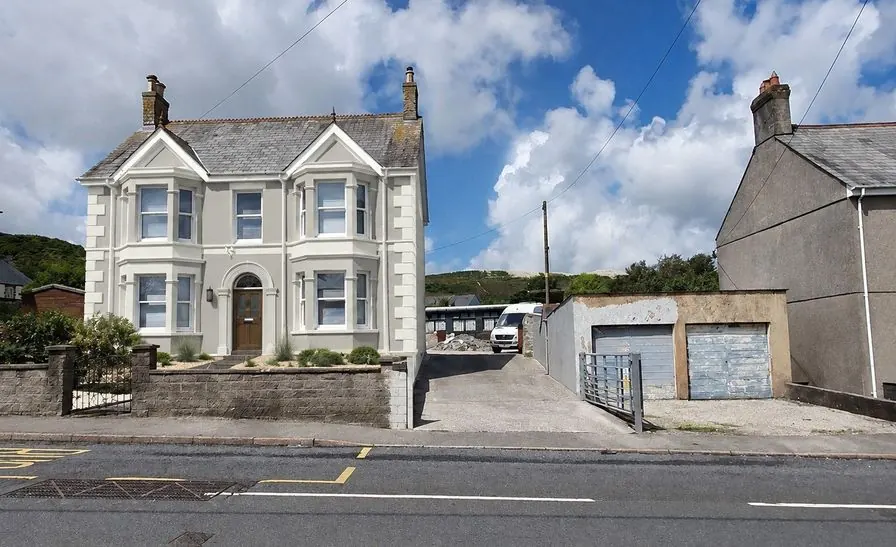 AI concept
Every example is a real photo and the result for it as it came out, judged blind before it went on this page.
How it works
- See it on your houseTwo options on a photo of your own home. Your windows, doors and roofline stay put.
- Know what it takesMaterials, rough quantities and a typical price range, with the source and date.
- Get it builtSend one brief to contractors so every quote covers the same work, and keep the whole project in one plan.
From AI house exterior design to a practical project
Use this page for the broad exterior concept, then refine paint, curb appeal, siding and material estimates with focused HomeGPT tools.
Virtually paint your house exterior
Test wall and trim colors with paint names and rough costs before buying samples.
Plan curb appeal upgrades
Start with a front yard makeover from a photo of the yard, then try new paint on a photo of the house.
Estimate siding and paint
Move from the AI concept to rough material quantities for siding or exterior paint.
Exterior design styles
A whole new look starts from a style. The styles on offer are the ones that passed our blind tests on real houses, so the list is short on purpose and grows as more pass.
Modern farmhouse pairs warm white walls with black frames and a wood door. Coastal leans on soft whites, pale blue-gray and natural timber. Scandinavian keeps to pale stucco, soft gray trim and simple lighting. Each option names its paints and materials, so you can price and order what you see.
Prefer one change at a time? Pick new siding, or a paint-only job that leaves everything but the paint alone. The roof, the windows and the porch stay as they are in every job.
Design every part of your home's exterior
Facade, front yard, patio, deck, fence and backyard: one photo-based tool covers the outside of the house, one job at a time.
Home exteriors
New wall colors and finishes, trim, the finish of the front door, wall lights and planting on your own facade.
Gardens and landscaping
Reimagine planting, paths, lawn and lighting from a yard photo on the garden design page.
Patios and decks
Outdoor living areas, surfaces and materials, from AI patio design to decks.
Driveways and walkways
Compare driveway surfaces, borders and their costs on the AI driveway design page.
AI front elevation design from a photo
An elevation is a building seen flat on from one side, and the front elevation is the face your street sees. Photograph that face straight on with the whole front in frame, and the AI redraws its surfaces while keeping the building's outline and proportions, so the concept still reads as your house.
What the AI redraws
- Wall finishes: paint, stucco or limewash on the walls you have, in a coordinated color scheme.
- Color blocking: which masses read light, which read dark, and where the accent lands.
- Window frames, the front door and the treatment around the entrance.
- Wall lights, house numbers and the planting caught in the same frame.
What the AI keeps
- The building outline: footprint, floor heights and the roofline.
- Where the windows, doors and garage sit across the facade.
- The number of floors and the main projections, bays and setbacks.
Holding the outline is the point of working from a photo: the concept still reads as your house, so a builder can tell what you are asking for. Small details can still shift between options, so check each one against your photo before you take it further.
Single story, double story (G+1) and duplex
Whatever is in the photo is what gets redesigned, so a single-story bungalow, a double-story house (G+1 on an Indian plan), a duplex or a row house sharing its side walls all work the same way. Taller and wider fronts just need more distance: step back across the road instead of tilting the camera upwards, because a steep angle stretches the upper floor and the concept copies that distortion.
How it compares with a 3D elevation drawing
A 3D elevation from an architect carries dimensions, levels and material specifications a contractor can build from and an authority can approve. This is not that. It is a photo-based concept of how a finished facade could look, and its job is to settle the direction (material, color, the balance of solid to glass) before anyone draws anything. Structure, working drawings and approvals stay with your architect or builder.
Plenty of people look for this as an "AI elevation generator": same job, different name. The AI elevation design page covers it with elevation-specific examples, or you can start from your own photo here.
Exterior color combinations for your house
A scheme is three decisions rather than one: a body color across most of the walls, a trim color on fascias, frames and eaves, and an accent for the front door, shutters or railings. What decides the outcome is the proportion between those three at full size, which is the one thing a paint chip cannot show you.
Farmhouse and cottage
Warm white body, black window frames, a wood-tone door. A sage or olive body with cream trim is the way to stand apart from the white farmhouse crowd.
Colonial and traditional two-story
A light body (warm white, pale gray, soft yellow) with crisp white trim and dark shutters in black, navy or deep green. Symmetry is the whole argument, so keep it to three disciplined colors.
Craftsman bungalow
Olive or sage walls, cream trim, and a terracotta or oxblood door, with rafter tails and brackets picked out in the trim color.
Modern and contemporary
One or two colors at most: charcoal or warm white walls with black frames, letting wood, metal and stucco supply the contrast instead.
Whole schemes on your house, not swatches
A chip tells you about the paint, not about the house. A charcoal that looks rich on a two-foot sample can feel heavy across an entire facade, and trim contrast that seemed subtle at that size can turn the front stripey at full scale. Picking a style applies a complete body, trim and accent combination to your own photo, next to the things you are not repainting (roof tiles, brick plinth, driveway, planting), which is usually what settles the argument.
Then check it in real light
A concept gives you a direction, not a color match: screens and paint are different materials, north light cools a color and afternoon sun washes it out. Narrow the field to two combinations here, then confirm with sample pots on the wall, looked at morning and evening, before buying anything. The exterior house colors guide goes through this year's palettes in more detail.
Exterior paint visualizer
Color only: walls, brick, stucco and trim repainted, with the rest of the facade left alone.
Exterior color picker
Browse real exterior colors from the major paint brands, then carry the one you like into the visualizer.
Color palette generator
Start from a color you cannot change (roof tile, brick, stone) and build complementary, analogous or triadic partners around it.
Why use AI for exterior design
- Ideas from your photo: a concept of your own exterior, not a stock house that only looks a bit like it.
- Try before you buy: see a change before spending money on contractors, paint or materials.
- Know what it takes: every option lists the paints and materials with rough quantities and typical prices.
- Boost curb appeal: compare directions that suit the house and the street, then pick one with your household.
- One plan: keep the house, the garden and the rooms inside in one project, and send one brief to contractors.
Wall finishes that change the look
A whole new look works with the walls you have. It changes how they are finished, not what they are built from.
Paint
The cheapest way to change a facade, and the one with the most choice. Masonry paint on stucco and brick, exterior acrylic on wood and fiber cement. A good painter spends most of the time on preparation, so the finish lasts.
Limewash
A soft, chalky finish for stone and brick that lets the wall breathe and weathers gently. It suits older houses and gives the texture underneath a quiet, even color.
Stucco
A smooth or textured coat over masonry that unifies a patchwork of materials. Integral-color stucco needs no painting; painted stucco needs a repaint every decade or so.
Trim, door and lights
Fascias, window frames and the front door carry the accent color, and new wall lights and house numbers finish the entrance. These small items often decide whether a scheme looks deliberate.
What a new exterior look costs
Repainting the outside of an average two-story house usually costs a few thousand dollars, more with heavy preparation or scaffolding; limewash and stucco cost more per square foot; new wall lights and planting add their own lines. Every HomeGPT option lists each item with a typical local price range, its basis and its date, so you see which change carries the cost. The exterior paint cost guide and the siding cost guide go further.
When you are ready, the plan turns your picks into one list with a total range, and the brief goes to two or three contractors, who quote each numbered item so the quotes compare line by line.
Before you call a contractor
Settle three things first: the direction (one option, or a mix of picks from both), the scope (which items you are actually doing this year), and a rough budget from the plan. Then check any rules that apply: historic districts, HOAs and some planning authorities limit exterior colors and materials. A brief that lists each item with its paint or material lets two or three contractors quote for the same job, which makes their prices comparable.
Take the right photo
Stand across the street in daylight and hold the phone level, with the whole front of the house in frame. Overcast days are kind to color; low sun casts long shadows that hide detail. Move the car out of the drive if you can, and avoid shooting through branches. A sharp, straight photo gives the most faithful concept: the AI follows what it can see, including any lean or stretch from the camera angle.
Questions
Frequently asked questions
Is HomeGPT exterior design free?
Start with 2 free designs a day, with no card and no watermark. Each design draws two options on your photo. Paid plans add more designs a day and remove ads.
Can I redesign my house exterior with AI?
Yes. HomeGPT turns a photo of your house into new looks for the walls, trim, front door, lights and planting, and lists what each change takes, so you can see new colors and finishes before making any changes.
What exterior styles are available?
A short list of styles that passed blind tests on real houses: modern farmhouse, coastal and Scandinavian today. The list grows as more styles pass.
Can I design my backyard and garden with AI?
Yes. Upload a yard photo instead of a house photo and HomeGPT offers garden jobs such as new lawn and borders or a new patio. The garden and backyard pages explain each one.
How accurate are the AI exterior designs?
They are photorealistic concepts drawn on your photo, meant for deciding and planning. The roofline, windows and doors stay where they are; small details can shift, so compare each option with your photo.
How much does AI exterior design cost?
The first 2 designs each day are free, with no card. Paid plans add more designs a day and remove ads; a one-off pass unlocks a single project with its full plan and brief.
Does the AI exterior design tool work on mobile?
Yes. HomeGPT works in any phone, tablet or desktop browser. Take a photo with your phone camera and upload it straight away.
What makes a good photo for AI exterior design?
Photograph your home in good natural daylight from straight on, not at a steep angle. Keep the full front in frame, avoid heavy shadows and use a clear day. A head-on shot from across the street gives the most accurate result.
Can I visualize different paint colors for my home?
Yes. Every style applies its own coordinated paint scheme, so switching styles is the quickest way to compare whole-house color directions. To change paint alone and keep everything else, use the exterior paint visualizer.
Can I use AI home exterior design free without login?
Yes. Upload a house photo and see your first designs in the browser without creating an account. An account (free) is only needed to save a project or share a brief.
What aspects of my home exterior can be changed?
Wall colors and finishes, trim, the finish of the front door, wall lights and planting in a whole new look; the walls alone with new siding or stucco; or the paint alone. The AI keeps the roofline, window positions, garage and lot shape so the concept still reads as your house.
How do I go from an AI concept to a real project?
Compare two or three directions, untick what you do not want and redraw with only your picks. The plan totals rough quantities and typical prices, and the brief goes to contractors so every quote covers the same work.
Can AI generate a front elevation design for free?
Yes. Upload a straight-on photo of the front of your house and HomeGPT draws front elevation concepts free, with no account needed. It reworks the facade on your existing structure rather than producing a measured drawing.
Does it work for two-story (G+1) house elevations?
Yes. Single-story, two-story (G+1), duplex and row houses all work, provided the full front is in the frame and shot roughly straight on. Photograph a tall facade from further back rather than tilting the camera up.
Can it suggest exterior color combinations for my home?
Yes. Each option applies a coordinated body, trim and accent combination to your own photo, with the paint names, so you judge the scheme at full scale next to your roof, brick and driveway instead of on a swatch.
Is HomeGPT an AI elevation generator?
That is one fair description: it generates front elevation and facade concepts from a photo of your home. It is not CAD software, so there are no dimensions or construction details, and an architect or builder still produces the drawings you build from.
Can I use AI exterior design when selling my home?
It is a useful way to show what a property could look like after updates, and to agree a direction with an agent or contractor. Treat the output as a concept image, label it as a visualization in any listing, and check your local rules on marketing imagery.
AI concepts, not quotes. Every price shows its basis and date. Your photo stays private.