Renovate AI Alternative: Free AI Home Renovation From a Photo
Renovate AI previews renovations from a photo of a space, mostly interiors, and asks you to sign up before you see a result. HomeGPT is the free, outdoor-first alternative: upload a photo of a facade, yard, patio or garden (or a kitchen, bathroom or room), pick what you are changing, and get two options back with no login, right here in this browser.
Start with your photo
Upload a photo of a facade, yard, patio, kitchen or room and see it renovated
- See it on your house
- Know what it takes
- Get it built
2 free designs a day · No watermark · No card needed
Or pick what you are changing first
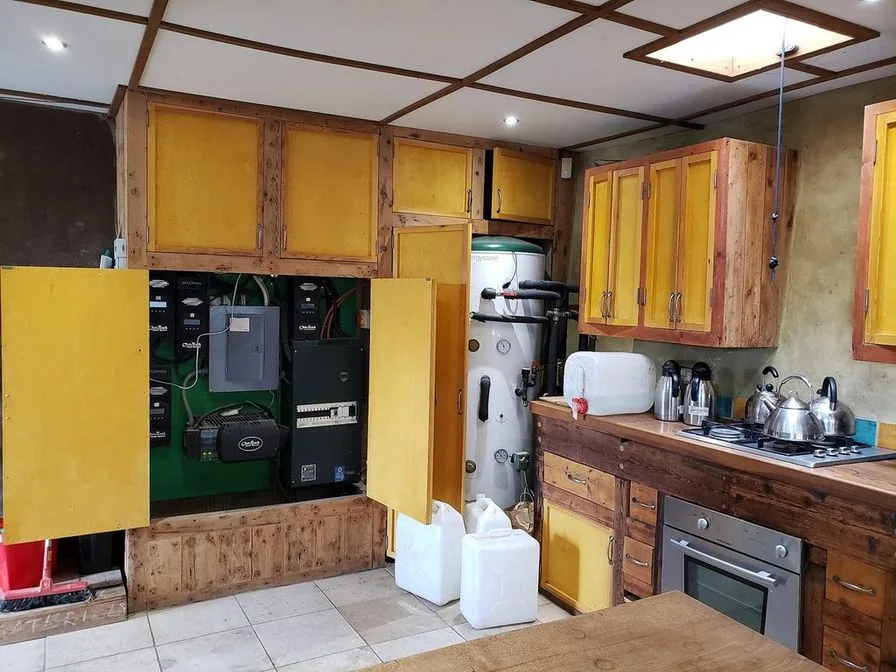 Before
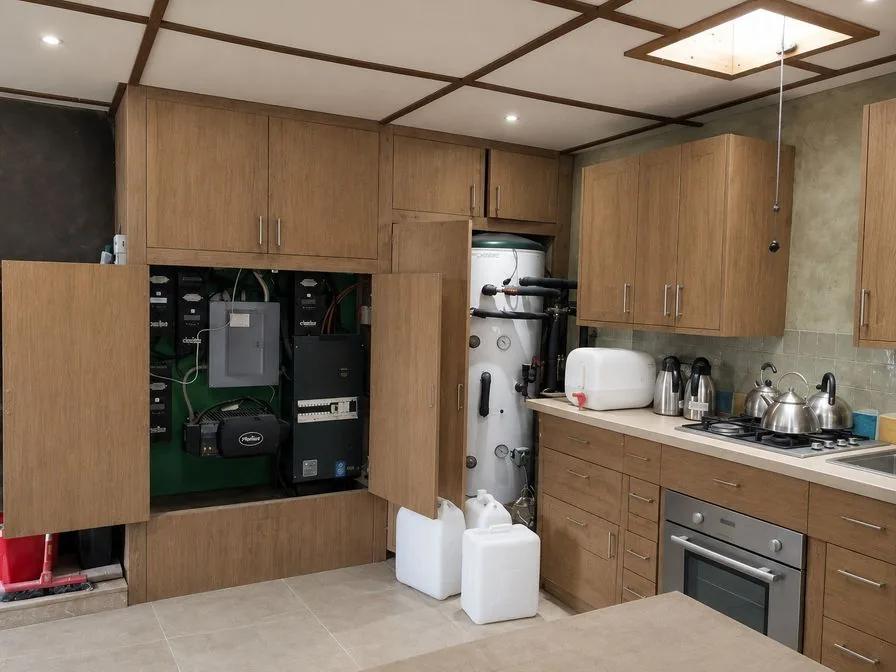 AI concept
Quick answer
What is the difference between Renovate AI and HomeGPT?
Choose Renovate AI if the project is an interior room and you do not mind creating an account first. Choose HomeGPT if you are renovating the outside of the house (facade, yard, patio, garden) or refreshing a kitchen or bathroom, and want to see the idea before paying for anything: 2 free designs a day, no card, no watermark, and every option lists what it takes, with links to materials calculators and cost guides for the budget.
A real renovation, drawn by the AI
A real kitchen photo and the AI concept for it: new fronts, countertop and tiles on the same layout. Every example on HomeGPT is a real photo and the result as it came out, judged blind before it went on a page.
Every example is a real photo and the result for it as it came out, judged blind before it went on this page.
How it works
- See it on your houseTwo options on a photo of your own home. Your windows, doors and roofline stay put.
- Know what it takesMaterials, rough quantities and a typical price range, with the source and date.
- Get it builtSend one brief to contractors so every quote covers the same work, and keep the whole project in one plan.
What is Renovate AI?
Renovate AI is an AI-powered renovation visualization tool. Homeowners, designers, agents, and builders can upload photos of their current spaces, and the AI generates realistic previews of potential renovations.
The tool specializes in renovation planning, letting users explore how different styles and changes would look before committing to costly work. By visualizing multiple options, homeowners can make more confident renovation decisions.
Renovate AI uses deep learning trained on thousands of real photos to produce realistic visualizations. It preserves the core layout of your space while applying new styles, finishes, and furnishing choices.
Renovate AI may offer trials, paid plans, and account-based features depending on its current packaging. Check the provider directly for current pricing, limits, and feature access before purchasing.
What is HomeGPT?
HomeGPT is a free AI home design tool focused on exterior, garden, yard, patio and outdoor renovation planning, with kitchen and bathroom refreshes and a new look for a room too. 2 designs a day cost nothing and need no login or card; create a free account only if you want to keep a project. It runs in the browser, and there is a free app for iPhone, iPad and Android.
HomeGPT keeps early planning lightweight: upload a photo, pick what you are changing, and compare two options before you discuss materials, cost and feasibility. Each option lists its paints and materials with a rough quantity and a typical local price, so the idea arrives with a first idea of the budget.
Styles and color directions join only after their results pass blind tests on real homes, so the list is short on purpose and grows as more pass. A note on any design lets you ask for something specific, such as keeping the red door.
The AI keeps the structure of your photo (rooflines, windows, doors and the layout) while it applies the new look. Compare each result with your photo before you take it further: the concepts are for inspiration, comparison and early contractor conversations, not construction drawings.
What HomeGPT can renovate on your photo
HomeGPT works one job at a time, and each job joined only after it passed blind tests on real photos. Every design draws two options and lists what each change takes.
Whole new look
Restyle the front of the house in a style that passed (modern farmhouse, coastal or Scandinavian): walls, trim, the front door finish, wall lights and planting, with the roof and openings kept.
Paint the house
New colors for the walls and trim, with real paint names and codes, painted onto the materials you have.
New siding
Two different wall materials side by side, such as fiber cement boards against smooth stucco, with colors to match.
Patio, deck and fence
Paving or decking, fence boards or stain, and the planting along them, inside your boundaries.
Yard and garden
Planting beds, paths, edging and lawn in a cottage or modern low-maintenance style, keeping the house, mature trees and any pool.
Kitchen and bath
Cabinet fronts, countertops, tiles, vanities and lighting, keeping the layout, plumbing and appliances. A bathroom photo can also be retiled on its own.
New look for a room
Furniture, textiles, lighting, decor and wall color in Japandi, mid-century modern or Scandinavian, keeping the walls, windows and floor.
Honest comparison: pros and cons
Every renovation tool has strengths and limitations. Here's a fair assessment of both platforms.
Renovate AI: pros
- Specialized focus on renovation-specific use cases
- Established presence in the AI renovation market
- Account system for saving and organizing projects
- Features designed for professional workflows
Renovate AI: cons
- Pricing, trials, and limits can change over time
- Account creation required to use the service
- Limited support for exterior and landscape projects
- Style library and feature mix should be checked directly
HomeGPT: pros
- Free to start without upfront signup: 2 designs a day
- Strong coverage for exteriors, gardens, patios, and outdoor spaces
- Two options per design, each with materials, rough quantities and typical prices
- A project plan and a brief for contractors when the idea is settled
HomeGPT: cons
- Newer platform with smaller established user base
- A short style list: only styles that passed blind tests are offered
- No download button yet: share a vote link or the brief instead
- Less name recognition than established competitors
Which renovation tool should you choose?
The best tool depends on your specific renovation needs. Here's our honest recommendation.
Choose Renovate AI if...
- You're a professional who needs project organization features
- You want a tool specifically branded for renovation projects
- You focus exclusively on interior renovation work
- You don't mind paying for a subscription service
- You prefer working with established, well-known tools
Choose HomeGPT if...
- You want to try renovation visualization without creating an account
- You need to visualize exterior renovations or curb appeal
- You want to renovate gardens, patios, or outdoor spaces
- You want to see what each change takes: materials, quantities and typical prices
- You prefer free tools before committing to a paid workflow
HomeGPT vs Renovate AI: detailed comparison
A practical side-by-side comparison of capabilities and workflow fit. Verify competitor pricing and limits directly because they can change.
| Feature | HomeGPT | Renovate AI |
|---|---|---|
| Price | 2 free designs a day; optional paid plans | Check provider |
| Signup required | No | Yes |
| Interior renovation | Kitchens, bathrooms and a new look for living rooms and bedrooms | Yes |
| Exterior renovation | Yes | Limited |
| Living room renovation | Yes | Yes |
| Kitchen renovation | Yes, keeping the layout | Yes |
| Garden and landscaping | Yes | No |
| Patio and deck renovation | Yes | No |
| Free renders | 2 designs a day, two options each | Check provider |
| Design styles | Styles that passed blind tests, plus color directions | Check provider |
| Custom style input | A note on any design | Limited |
| Generation speed | Varies with the photo, the job and demand | 10–30 seconds |
| Mobile friendly | Yes | Yes |
| What each change costs | Rough quantity and typical local price per item | Check provider |
| Download high-res | Not yet | Yes |
How to use HomeGPT for renovations
Visualize your renovation project in three simple steps. No account required.
1. Photograph your current space
Take a clear photo of the exterior, yard, patio, garden, kitchen or bathroom you want to renovate. For best results, capture the full project area with good daylight and minimal obstruction. HomeGPT accepts JPEG, PNG and HEIC photos straight from your phone.
- Stand back far enough to fit the whole area in frame
- Avoid harsh shadows or very dark areas
- Include the elements you want to change
2. Pick what you are changing, then a style or direction
Choose the job: a whole new look, paint, new siding, the patio, deck and fence, the yard and garden, a kitchen or bathroom refresh, or a new look for a room. Then pick a style that passed blind tests, or a color direction such as light and fresh or natural greens, and add a note for anything specific.
- Try a second direction to see a different possibility
- Match the style to your home's architecture for cohesion
- Use the note for ideas like "keep the red door"
3. Compare two options, then plan
HomeGPT draws two options on your photo, each listing what it changes with a rough quantity and a typical price. Untick anything you would skip and redraw, keep the option you like in your project, and share it with contractors or family.
- Compare both options against your photo
- Save the project to come back later (free account)
- Send the brief to contractors so every quote covers the same work
Start your renovation project
Start with a photo of your home exterior, or pick the job on the card above.
Exterior
Improve your curb appeal with a whole new look for the front of the house.
Kitchen and bath
Refresh fronts, countertops and tiles while the layout stays.
Open the full design tool for gardens, patios and every other job.
Understanding AI renovation tools
Whether you choose Renovate AI, HomeGPT, or another tool, understanding what AI renovation tools can and can't do helps set the right expectations. AI renovation tools are particularly valuable for:
- Visualizing multiple renovation possibilities before committing to costly changes
- Communicating your vision clearly to contractors, architects, and family members
- Exploring design styles you might not have considered
- Getting a realistic sense of how changes will affect the feel of your space
- Building confidence in your renovation decisions
- Creating visual references for contractor bids and consultations
That said, AI visualizations are best used as inspiration rather than construction drawings. For actual renovation work, always consult licensed contractors, architects, or designers who can address structural requirements, building codes, and precise measurements.
Both Renovate AI and HomeGPT represent the current state of AI renovation visualization. We recommend trying both to see which better fits your project needs and preferences.
Comparing other AI home design tools?
See how HomeGPT stacks up against the other tools people search for, or read what each free tier actually includes.
Questions
Frequently asked questions
Is Renovate AI free?
Renovate AI sets its own trials, render allowances and plans and can change them, so check the provider directly for what is free today. HomeGPT is the part we can promise: 2 designs a day cost nothing, there is nothing to buy to start, and you do not need an account to start.
Is there a Renovate AI app?
Check Renovate AI's own site for its current mobile apps. HomeGPT has one: a free app for iPhone and iPad on the App Store and for Android on Google Play. The website needs no install at all.
Can I use it online without installing anything?
Yes. HomeGPT runs in any modern browser on a phone, tablet or computer, with nothing to install and no account to create. The upload at the top of this page is the real tool, not a demo: pick a photo and the setup opens with it. The mobile apps are only there if you would rather shoot the photo and keep the result on your phone.
What is the difference between Renovate AI and HomeGPT?
Renovate AI is a general renovation visualizer used mostly for interiors, and it asks you to sign up first. HomeGPT is outdoor-first and free to start: facades, curb appeal, yards, patios, decks and gardens, plus kitchen and bathroom refreshes, with no login to start and a typical price for every change it draws.
What is Renovate AI and what does it do?
Renovate AI is an AI-powered tool that helps homeowners preview renovations before starting work. Upload a photo of your current space, choose a style, and the AI generates photorealistic visualizations of potential changes.
Do I need an account to use HomeGPT for renovations?
No upfront account is required to try the main design flow. You can upload a photo, pick what you are changing, and start designing; signing in (free) is mainly useful when you want to save a project or share a brief.
Can I visualize exterior renovations with Renovate AI?
Renovate AI is often used for interior renovation workflows. HomeGPT focuses on exterior renovation planning, including facades, gardens, patios, decks, and landscaping.
Which renovation AI tool has more design styles?
HomeGPT offers a short list of styles that passed blind tests on real homes, plus color directions and a note for anything specific, and adds styles as they pass. Compare the available styles in each tool because competitor style libraries change over time.
How accurate are AI-generated renovation visualizations?
AI renovation visualizations capture the overall style, mood, and layout of a redesigned space well. They are great for exploring ideas and comparing options. However, they do not account for structural constraints or exact measurements, so treat them as inspiration rather than construction plans.
Can AI renovation tools replace professional contractors?
AI tools like Renovate AI and HomeGPT are excellent for exploring renovation ideas and visualizing possibilities. However, they work best as a planning and inspiration tool. For actual construction, always work with licensed contractors who can handle structural requirements, permits, and building codes.
Can I use AI renovation tools for commercial properties?
Some AI renovation tools can be useful for commercial spaces, but HomeGPT is focused on homes: house exteriors, yards, patios and gardens, and residential kitchens, bathrooms and rooms. For commercial construction decisions, treat AI images as early concept references only.
AI concepts, not quotes. Every price shows its basis and date. Your photo stays private.