AI Paint Visualizer: Virtually Paint Your House Exterior Free
Upload a photo of your house and preview new colors for the siding, brick, stucco and trim, with the paint names, rough gallons and typical cost for each. This exterior paint visualizer is free in your browser: 2 designs a day, with no account or card needed.
Start with your photo
Job: Paint the housePhotograph the front of your house from the street
- See it on your house
- Know what it takes
- Get it built
2 free designs a day · No watermark · No card needed
 Before
 AI concept
Quick answer
Can I virtually paint my house exterior for free?
Yes. Upload one photo of your house and HomeGPT paints it two ways on the same picture: real paint colors on the walls and the trim, each with its name and code, a rough number of gallons and a typical local price. You get 2 free designs a day with no card and no watermark. Treat it as a concept, then confirm the shortlist with physical samples and an exterior paint estimate.
Real houses, repainted by the AI
Real photos and the paint concept for each. The roof, windows and anything not listed stay as they are.
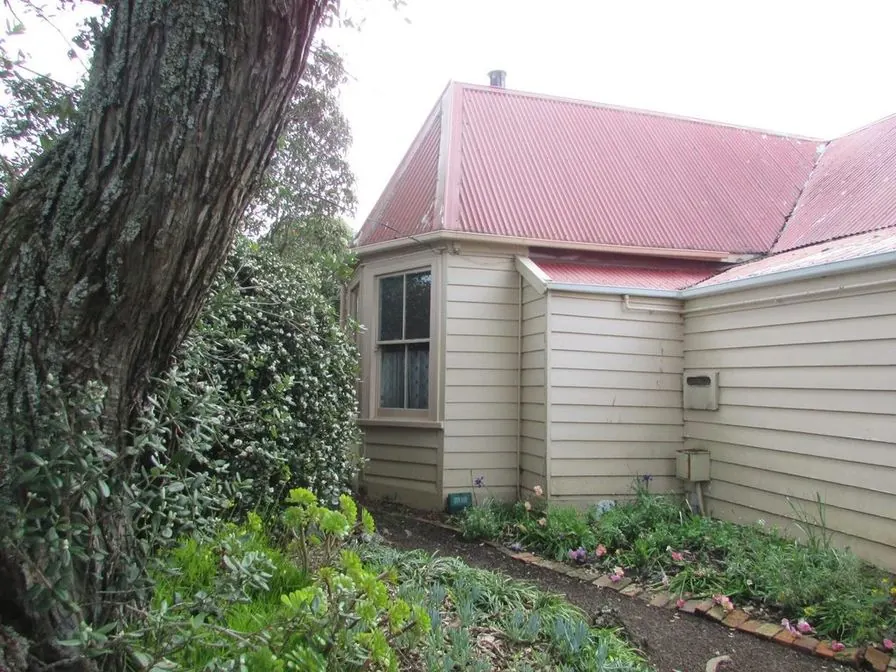 Before
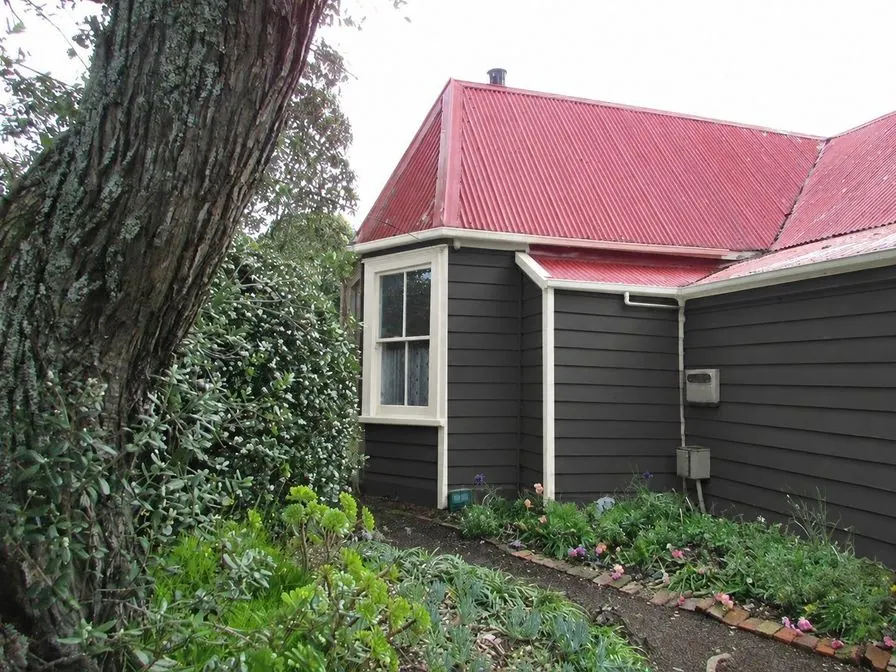 AI concept
Every example is a real photo and the result for it as it came out, judged blind before it went on this page.
How it works
- See it on your houseTwo options on a photo of your own home. Your windows, doors and roofline stay put.
- Know what it takesMaterials, rough quantities and a typical price range, with the source and date.
- Get it builtSend one brief to contractors so every quote covers the same work, and keep the whole project in one plan.
Virtually paint your house exterior before you buy samples
Use the visualizer as a first-pass decision tool: compare light and dark siding, test a safer trim color, or see whether painted brick fits your curb appeal plan. The AI preview is not a replacement for real paint samples, but it helps you narrow the shortlist before you spend money on quarts, ladders or contractor time.
Choose color schemes
Exterior house color combinations that work in 2026.
Estimate paint quantity
Calculate gallons after you pick a direction.
See full curb appeal
Pair new paint with a front yard makeover: beds, edging and lawn.
What the paint job gives you
Paint the house is one job in HomeGPT: one photo in, two finished color schemes out, each one priced.
- Two options on your own photo, A and B, so you compare whole schemes side by side instead of one swatch at a time.
- Spec tags drawn on the picture: the wall color, the trim color and any accent, each with the paint name, brand code and finish.
- A rough quantity and a typical local price range for every item, with the basis and the date, so you know roughly what the job takes before anyone quotes.
- Tick boxes: keep the trim from option A and the door from option B, then redraw with only your picks.
- A plan you can share with a painter, with every item numbered so quotes compare line by line.
Pick a direction at setup: light and fresh, dark and classic, natural greens, or let HomeGPT pick from the photo. The paint stays on each surface it belongs to: painted brick stays brick, stucco stays stucco, and the roof, windows, chimneys and neighboring houses are left alone.
AI exterior paint visualizer or a paint brand's visualizer?
Paint brands publish their own color visualizers, among them Sherwin-Williams, Behr and Valspar. They show that brand's colors on sample houses, and most also let you upload a photo of your own. Once you have settled on a brand and want to see its exact chips, they are the tool to use.
HomeGPT starts from your photo instead of a fan deck. It draws two whole schemes on your house (walls, trim and any accent together) and tags each item with the paint name, code and finish, a rough number of gallons and a typical local price. Tap a tag on the result to swap that item to another named color and the picture is redrawn; the first swap on each design is free.
A sensible order: settle the direction for the whole house here, then fine-tune the exact shade with the brand's visualizer and physical samples on the wall.
Visualize paint on different surfaces
Siding and exterior walls
See how colors look on vinyl, wood or fiber cement siding. The AI keeps the light, shadow and texture of the real wall, so the preview reads like the finished job rather than a flat swatch.
Brick exteriors
Painted brick is a big, hard to undo decision. Preview how your brick house would look with a fresh coat, from classic white to a deep charcoal, before you commit to primer and masonry paint.
Trim and accents
See whether white, cream or black trim frames the windows best, and how an accent sits against the walls. Where the front door is in the photo, a scheme can give it a color that suits the walls; changing the door color on its own, with the rest of the house as it is, is not something the paint job offers.
How to choose exterior paint colors
Start with undertones
Every neutral has a warm (yellow, red, brown) or cool (blue, green, violet) undertone. Match the undertone of your fixed elements: roof shingles, brick, stone and the driveway. A warm gray siding next to a cool blue-gray roof is the most common color clash.
Account for light
Direct sun washes colors out, so south and west facing walls read lighter than the chip. Shaded and north facing walls read darker and cooler. If your house sits in full sun, go a shade deeper than your first instinct; if it is heavily shaded, go a shade lighter.
Respect the architecture
Colonials and traditional houses suit classic whites, navies and muted greens. Modern farmhouses lean on high contrast white with black trim. Craftsman and ranch houses take earthy, nature based palettes. Use the three color rule: one body color, one trim color and one accent for the door.
Exterior paint finish guide
Finish (sheen) matters as much as color. Higher sheen is more durable and easier to clean, but it shows every surface flaw. Most exteriors mix two finishes: a lower sheen on the body and a higher sheen on trim.
Flat or matte
Hides imperfections in older siding and stucco. Least washable, so best on walls that are not touched or splashed often.
Satin or eggshell
The standard choice for siding. Balances durability and low sheen, cleans up with a hose, and works on vinyl, wood and fiber cement.
Semi-gloss
Use on trim, doors and shutters. The extra sheen highlights detail, sheds water and wipes clean, which suits high touch areas.
Gloss and high gloss
Reserved for front doors and small accents. Shows every brush mark and dent, so surface preparation has to be near perfect.
Tips before you buy paint samples
- Narrow to 2-3 colors first. Use the visualizer to cut the shortlist before spending on sample pots, which add up once you test more than a few.
- Paint sample boards, not the wall. Two coats on poster board or scrap drywall let you move the color around the house and compare walls without patching anything.
- Check the color at three times of day. Morning, midday and evening light shift how a color reads, and the sunniest and shadiest walls can look like two different paints.
- Remember sheen changes color. The same formula reads darker in a glossier finish, so test samples in the finish you plan to use.
- Check the rules before committing. HOAs and historic districts often limit exterior colors, so confirm before you buy gallons.
- Then estimate quantity. Once you pick a color, the exterior paint calculator estimates gallons so you do not over-buy.
Five paint directions to try on your own house
Classic exterior paints that work on many houses. Each option HomeGPT draws names its paints like these, with the brand code, so you can order the right samples.
White Dove
A warm white. Compare a soft white against your existing roof and brick.
Hale Navy
A deep blue. Explore a darker facade or a contrasting trim.
Revere Pewter
A warm neutral. Try a muted greige next to stone, paving and planting.
Kendall Charcoal
A charcoal. See how a deeper gray changes the balance of the facade.
Alabaster
A soft white. Compare a second light option before choosing samples.
Screen colors and AI previews are approximate. Compare physical samples on your house in different light before buying paint.
For a whole new look rather than paint alone, see AI exterior design, and for the yard in front of the house, AI curb appeal.
Keep the house, change the paint
The paint job changes paint only. Siding stays siding, brick stays brick and the windows, roofline and masonry should remain recognizable. Compare the result with your original photo, and if something you did not ask for changed, say so with "Not my house?" on the result.
Turn a color shortlist into a paint estimate
Measure each wall, deduct openings and choose the number of coats. For example, 1,000 sq ft of paintable wall × 2 coats ÷ 350 sq ft per gallon needs about 5.7 gallons before waste, normally rounded up to 6. Check the coverage on your specific can; texture, primer and application change the amount.
Calculate paint for your measurements, plan preparation, materials and labor, or check manufacturer coverage guidance.
What exterior painting costs
Most of the cost of an exterior paint job is labor and preparation: washing, scraping, filling, priming and protecting windows and planting. Paint itself is often less than a fifth of the total. Height adds cost, because a two-story house needs ladders or scaffolding, and so does the number of colors, because every color change on trim and frames is slow, careful work. Each HomeGPT option prices its items separately, so you can see what a bold door costs compared with a whole-house color change. The exterior paint cost guide has 2026 ranges by house size.
Paint my house exterior app
There is nothing to download for paint colors: the visualizer runs in your phone or desktop browser, so you can photograph the house, upload the photo and preview new wall, trim and door colors on the spot. For a whole exterior makeover rather than paint alone (materials, curb appeal and landscaping), the free HomeGPT app for iPhone, iPad and Android does the same photo in, concept out job from your camera roll.
Questions
Frequently asked questions
What is an AI paint visualizer?
An AI paint visualizer takes a photo of your house and repaints it in the colors you choose, keeping the light, shadows and texture of the real walls so the preview reads like the finished job rather than a flat color swatch. This one is built for exteriors: walls, brick, stucco and trim, with the paint names and rough costs on the picture.
Can I virtually paint my house exterior for free?
Yes. You get 2 free designs a day in the browser with no card and no watermark. Upload a photo of the house, pick a color direction and HomeGPT draws two painted options on your own photo.
Is there a paint my house exterior app?
There is nothing to install for paint colors: the visualizer runs in a phone or desktop browser, so you can photograph the house and preview colors straight away. The free HomeGPT app for iPhone, iPad and Android covers full exterior and garden redesigns from a photo.
What is the best free exterior paint visualizer?
It depends on what you want back. To compare whole color schemes on a photo of your own house, with paint names, rough quantities and typical prices, an AI visualizer like HomeGPT does it free, with no account needed to start. To see one brand's exact chips, use that brand's own visualizer, such as Sherwin-Williams, Behr or Valspar. Either way, confirm the final color with physical samples on the wall.
Do I need to upload a photo of my house?
Yes. The preview is drawn on your own photo, so the new color sits on your real siding, roof and brick. A straight-on shot from the street in daylight works best. Treat the result as a visual guide and confirm your shortlist with physical paint samples before buying.
What type of photos work best?
Photos taken from the street in natural daylight produce the best results. Avoid heavy shadows, cars or trees in front of the walls, and keep the whole front of the house in frame.
Which surfaces can I preview?
The walls (siding, stucco or painted brick) and the trim, each as its own item with its own paint, plus the front door where the scheme includes it. You can untick any item to keep it as it is and redraw with only the changes you want. A door-only color change is not offered.
Can I visualize interior paint colors?
This job is made for exteriors. For rooms inside, upload a room photo instead: HomeGPT offers its own wall paint job for interiors.
How accurate is the AI color preview?
The preview is a realistic concept, not a color-matched proof. Screens and lighting shift color, so order physical samples of the named paints before you decide.
What exterior paint finish should I use?
Satin or eggshell is the standard choice for siding because it balances durability and low sheen. Use semi-gloss on trim, doors and shutters where you want detail to stand out and easy cleaning. Flat finishes hide flaws on older siding but are harder to wash.
How do I match paint colors to my roof and brick?
Treat fixed elements like the roof, brick and stone as anchors: identify their undertone (warm or cool) and pick siding and trim colors in the same family. Upload a photo where those elements are clearly visible so the preview shows how the new color sits next to them.
Do I still need physical paint samples after using the visualizer?
Yes. Use the visualizer to narrow your shortlist to 2-3 colors, then paint sample boards and check them in morning, midday and evening light. Sunlight and sheen both shift how a color reads on a real wall.
How much does it cost to paint a house exterior?
It depends on the size of the house, the surface and how much preparation it needs. Each HomeGPT option shows a typical local price range per item with its basis and date; the exterior paint cost guide breaks down labor, materials and preparation in more detail.
AI concepts, not quotes. Every price shows its basis and date. Your photo stays private.